
A mid-sized firm in Nottingham is halfway through an Azure migration. The technical plan looked solid. Identity was mapped, data was staged, and the project board expected a smooth move.
Then the rollout slowed.
Department heads started saying their teams were “still getting used to it”. Staff attended meetings, nodded along, then carried on saving files locally, avoiding Teams channels, and asking colleagues for old workarounds. The service desk saw confusion, not outright rebellion. Deadlines slipped anyway. Frustration rose on both sides. IT felt the platform was ready. Users felt the change had been dropped on them.
That's the point many SME IT leaders discover that resistance to change management isn't a soft issue sitting beside the migration. It sits inside the migration. A Microsoft 365, Azure, Dynamics 365, or Copilot rollout can be technically correct and still stall if people don't trust it, don't understand it, or don't see how it fits their day-to-day work.
For teams looking at the people side of transformation in more depth, this Guide to AI & ITSM OCM success is a useful companion read because it connects technology delivery with adoption discipline.
Introduction to Resistance in Change Management
Resistance often gets described as if it starts with complaints. In practice, it usually starts earlier and more subtly. A finance manager keeps exporting reports to spreadsheets because the cloud dashboard feels unfamiliar. A project coordinator says the new SharePoint structure is fine, but still sends attachments by email. A team leader agrees to the Azure-based process in a workshop, then tells staff to “keep the old way going for now”.
None of that looks dramatic. All of it slows delivery.
In Microsoft migrations, this matters because the intended gains depend on behaviour changing after go-live. If staff still rely on legacy habits, you don't get the cleaner collaboration, stronger governance, or better visibility you planned for. You get a hybrid mess of new licences and old routines.
Resistance is rarely proof that people are difficult. More often, it's proof that the change hasn't yet become workable or believable in their world.
IT leaders sometimes focus so hard on tenant readiness, cutover sequencing, and security baselines that they only spot people issues once adoption has started slipping. By then, the conversation becomes reactive. Service desk tickets rise. Sponsors ask why benefits aren't appearing. Team managers blame the platform. Users blame the rollout.
A better approach is to treat resistance as an early operating signal. If people hesitate, avoid, delay, or sidestep the new Microsoft environment, that signal tells you something is unresolved. It may be trust. It may be training. It may be unclear ownership. But it won't fix itself just because the migration technically completed.
Core Concepts of Resistance to Change
Resistance becomes easier to manage when you stop treating it as one thing. It has different roots, and each root needs a different response.
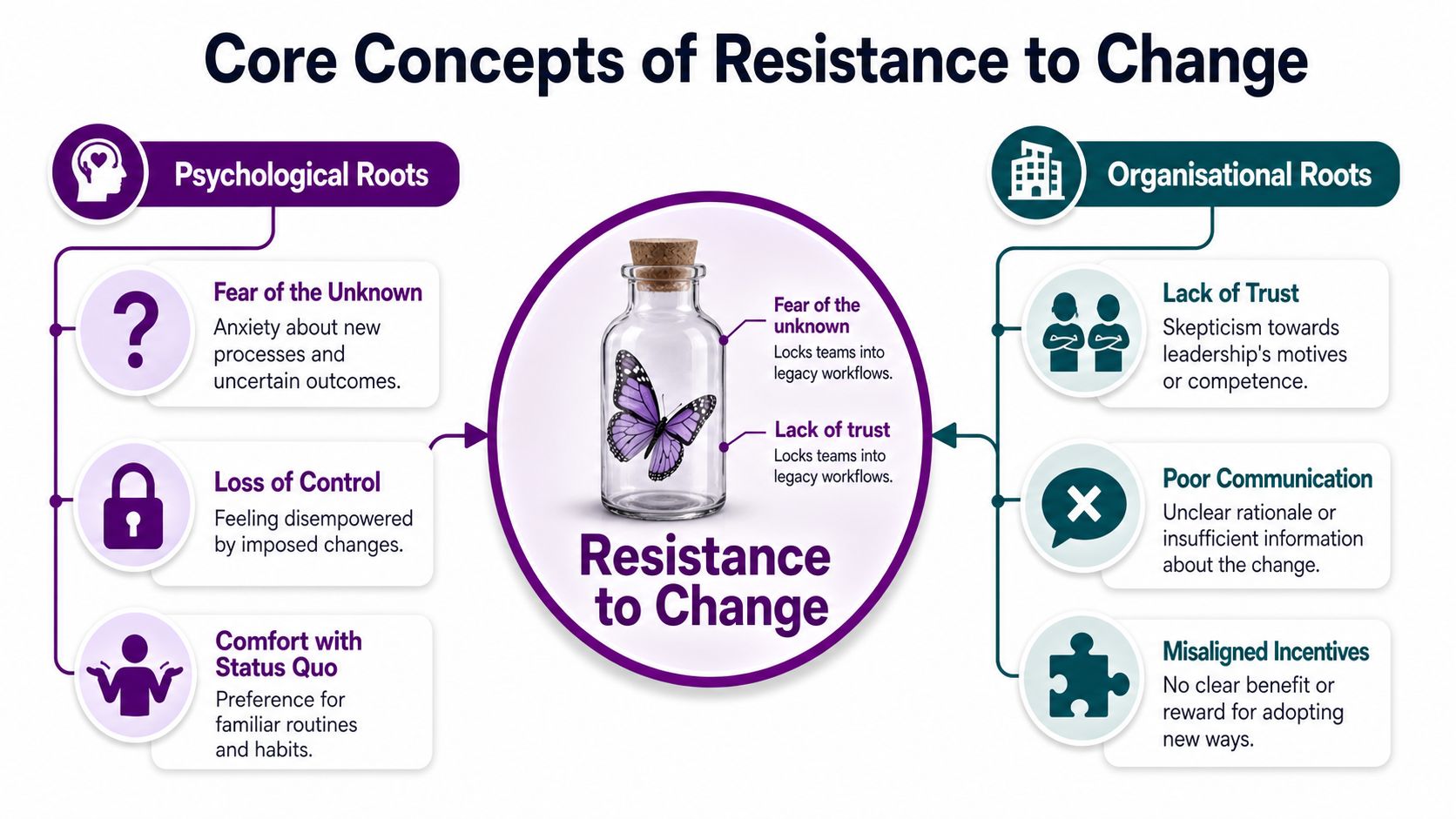
The butterfly in the bottle problem
A simple analogy helps. Think of a butterfly trapped inside a bottle. The butterfly can move, but it can't move freely because the barrier is invisible from a distance. That's how many teams experience change. Leaders can see the destination. Staff can only feel the constraint.
Two forces often create that bottle. Fear of the unknown and lack of trust.
If a business moves file storage into SharePoint, introduces conditional access, or shifts line-of-business systems into Azure, staff may worry about what breaks, what they'll lose, or whether they'll be judged while learning. If previous projects went badly, they may also assume leadership is underestimating the disruption.
The four drivers that show up most often
In the UK and Ireland, employee resistance remains the single most commonly cited reason for change initiative underperformance among SMEs. Also, 37% of employees resist, with the leading drivers being lack of trust at 41%, insufficient awareness at 39%, fear of the unknown at 38%, and inadequate information at 28%, according to ProfileTree's summary of change management statistics.
Those four drivers are practical, not abstract:
- Lack of trust means staff doubt leadership's motives, judgement, or follow-through.
- Insufficient awareness means people don't understand why the change is happening.
- Fear of the unknown means uncertainty feels more threatening than the current problems.
- Inadequate information means users never got enough detail about what changes for them.
For a Microsoft migration, each one creates a different behaviour. A trust issue leads to scepticism. An awareness issue leads to indifference. Fear leads to avoidance. Poor information leads to mistakes and reversion to old methods.
Why organisational design matters
Resistance is not only personal. It also grows in the spaces between teams.
Research on UK organisations found that less than 35% of employees participate in decision-making processes, which links to heightened resistance because trust in management is weaker when people feel excluded, as discussed in this UK organisational research paper.
That matters in SMEs because technology choices often get made by a small group, then passed into operations as if implementation alone will create acceptance. It won't. If staff had no voice in how Teams channels are structured, how a Dynamics 365 workflow changes, or how Copilot is introduced, they may comply outwardly while withholding commitment.
Practical rule: When users say, “No one asked how this affects our work,” don't hear that as a complaint about process. Hear it as a warning about adoption risk.
Resistance Challenges in Cloud and Microsoft Migrations
Cloud migrations create a special kind of resistance because the change is both visible and invisible. Staff can see new screens, new logins, and new locations for files. They can't always see the reasons behind security controls, governance rules, or architectural decisions.

Overt resistance and silent resistance
Some resistance is easy to spot. A department openly objects to moving shared drives into SharePoint. A manager argues that Teams is “worse than email”. A user keeps raising the same complaint in workshops.
That's overt resistance. Annoying, yes, but visible.
The harder problem is silent resistance. Staff agree in meetings, avoid conflict, and then privately delay adoption. They keep local copies “just in case”. They ask a colleague to do tasks in the old system. They postpone learning the new process until someone notices.
In UK SMEs and charities, silent resistance can cause 30–40% of cloud transformation projects to stall, as described in NCVO's discussion of managing change resistance.
What it looks like in Microsoft environments
In Microsoft 365 and Azure rollouts, silent resistance often appears as behaviour that looks harmless in isolation:
- Local workarounds where staff download files instead of collaborating in SharePoint or Teams
- Parallel processes where managers approve work by email even though the workflow now sits elsewhere
- Selective use where people log in to the new platform but complete key tasks in the old one
- Shadow support habits where staff rely on one experienced colleague rather than using the new process properly
A charity moving to Microsoft 365 can be especially exposed because informal relationships often shape how work gets done. If trusted long-serving staff don't believe the new setup suits service delivery, others may politely agree in public and ignore it in practice.
One practical response is to build capability before frustration hardens. In this context, focused enablement matters, especially with role-specific Microsoft skills. Teams planning adoption support alongside rollout often benefit from guidance like upskilling your staff with expert Microsoft training.
A short explainer helps show why this pattern is easy to miss:
The hidden cost of polite agreement
Silent resistance is expensive because your reporting can still look reassuring for a while. Attendance may be fine. Communications may have gone out. Project milestones may still be marked complete.
But usage quality drops. Staff revert. Errors repeat. Benefits stay theoretical.
The most dangerous sentence in a migration is “No one's complained, so it must be going fine.”
If people aren't speaking, don't assume they're aligned. In many Microsoft migrations, they're adapting around the change instead of adopting it.
Effective Frameworks to Manage Resistance
A framework helps when resistance starts to spread beyond one team or one complaint. It gives leaders a repeatable way to decide what to do next.
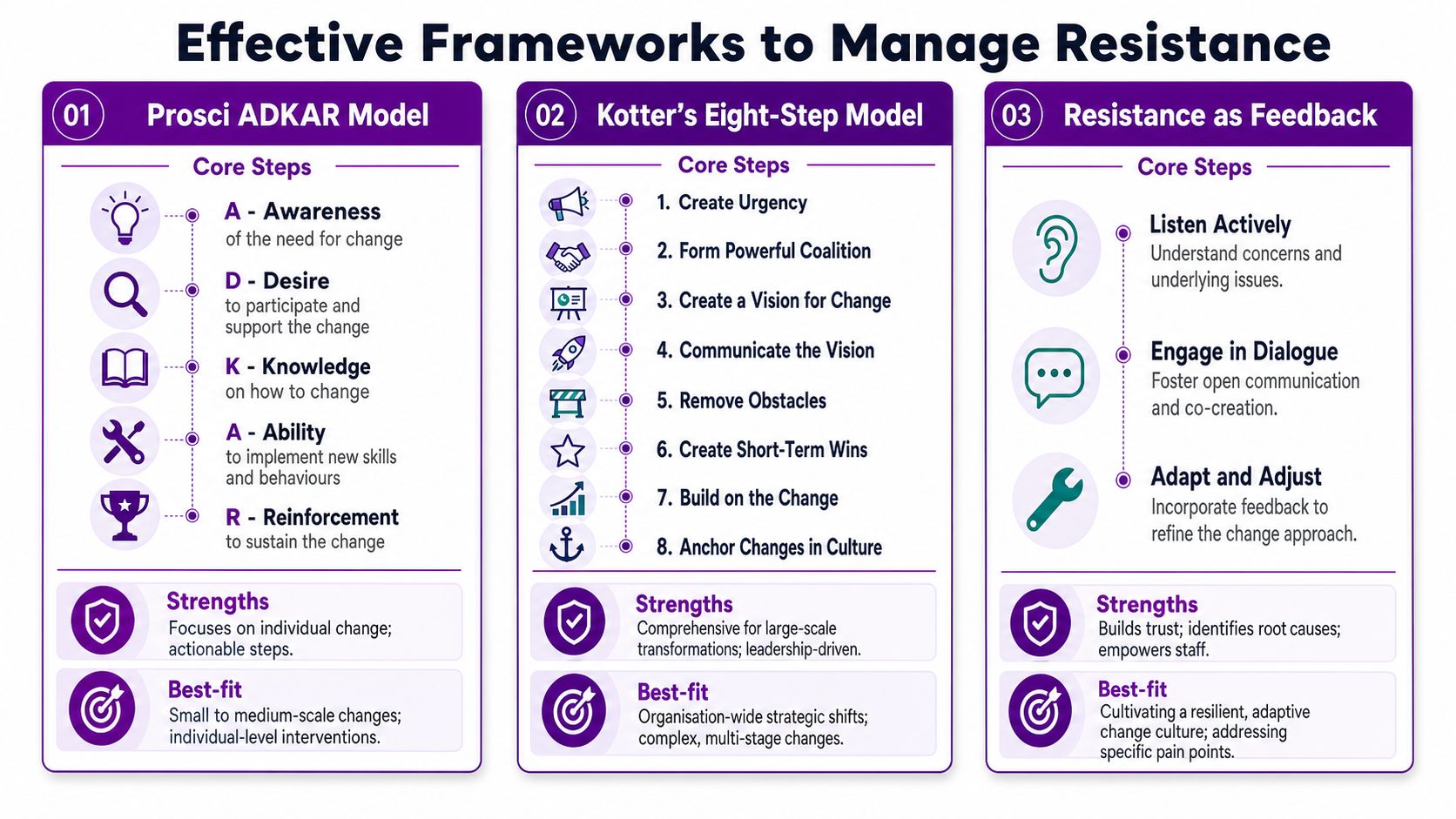
Prosci ADKAR for user-level adoption
ADKAR works well when your Microsoft migration challenge sits at the individual level. The sequence is simple. Awareness, Desire, Knowledge, Ability, Reinforcement.
That structure suits rollouts such as moving staff from file shares to SharePoint, introducing Teams telephony, or embedding new Dynamics 365 routines. If users don't understand the need for the change, or they know the reason but lack the ability to work differently, ADKAR helps isolate the missing step.
Kotter for broader organisational shifts
Kotter's eight-step model is stronger when the migration is part of a larger strategic shift. For example, if Azure migration is tied to security modernisation, hybrid working, and a wider operating model change, you need more than user training. You need leadership visibility, coalition building, communication discipline, and cultural follow-through.
That's why Kotter often fits complex, organisation-wide programmes better than a narrower adoption tool. For leaders refining delivery discipline around larger transformation work, this piece on effective IT project change management offers helpful context.
Resistance as feedback
This is the most underused approach, and often the most valuable in Microsoft migrations.
The idea is simple. Don't treat resistance only as obstruction. Treat it as information. A resistant user may be pointing to a broken workflow, unrealistic assumption, or training gap.
That perspective has gained traction in UK change discussions. A ChangeQuest article on why resistance can be a force for good argues that resistance contains useful information. The same verified dataset states that recent 2025 NHS Improvement Hub data showed that treating resistance as feedback reduced AI adoption failure rates by 22% in UK public sector projects, a useful lesson for teams introducing tools such as Copilot.
Use this mindset when people object with specifics. If staff say a Teams approval path adds confusion, a Power Platform form duplicates effort, or Copilot produces outputs they don't trust, don't rush to “handle the resistance”. First inspect whether they're right.
A broader digital context for this sits in change management in digital transformation.
Practical Strategies and Checklists
Frameworks help you think. Checklists help you act. In SMEs, the strongest resistance work is usually unglamorous, consistent, and built into the migration plan.

Stakeholder communication plans
One message for everyone rarely works. Finance, operations, HR, and field teams don't ask the same questions about Microsoft 365 or Azure.
Use a simple checklist:
- Audience map. Which groups are affected directly, indirectly, or later?
- Reason for change. Can each group explain why the migration matters in plain language?
- Impact summary. Do they know what changes in their daily work?
- Channel choice. Will this group respond better to manager briefings, short videos, email updates, or team demos?
- Feedback route. Do they know where to raise concerns safely?
Executive sponsorship alignment
If senior leaders only appear at launch, staff read the migration as an IT project, not a business change.
A sponsor checklist should include:
- Visible ownership. Which leader is clearly backing the change?
- Consistent message. Are leaders saying the same thing about purpose and priorities?
- Manager cascade. Have line managers been briefed before staff communications go live?
- Decision pace. Is there a named route for unblocking policy or process issues quickly?
The quality of that listening environment matters. The 2024 Oak Engage Change Report found that 65% of employees feel more committed when they can speak to a peer-to-peer change champion without fear of reprisal, as highlighted in the Oak Engage report. That matters when staff hesitate to challenge leadership directly.
Manager cue: If your sponsor talks about the platform but never about the people affected by it, trust will drain fast.
Role-based training
Generic training creates false confidence. A procurement user, a service desk analyst, and a charity fundraiser need different examples, even inside the same Microsoft tenant.
Your checklist can stay short:
- Role scenarios. Does training show the tasks users perform?
- Timing. Is training close enough to go-live that people remember it?
- Practice. Can users try common tasks safely before they need them live?
- Support materials. Are quick guides labelled by role, not by product alone?
For teams planning rollout in parallel with adoption support, a detailed Microsoft 365 migration checklist can help keep technical and human readiness aligned.
Pilot programmes
Pilots should test more than technology. They should test confidence, language, friction points, and manager readiness.
Ask:
- Which users are influential, not just cooperative?
- What workarounds appeared during the pilot?
- Which questions kept coming back?
- What must be adjusted before wider release?
Governance structures
Resistance gets worse when no one owns the response.
A practical governance agenda might include:
| Agenda item | What to review |
|---|---|
| Adoption risks | Which teams are lagging or bypassing the new way of working |
| User feedback | What complaints, concerns, or suggestions appeared this week |
| Training gaps | Which roles still lack confidence or clarity |
| Process blockers | What operational issues need sponsor decisions |
| Next actions | Who owns the fix, by when, and how it will be checked |
Metrics for Tracking Resistance to Change
You can't manage resistance well if you only discuss it in anecdotes. “The team seems fine” is not a metric. Neither is “training went well”.
That matters because approximately 70% of all change initiatives fail to achieve their stated goals, with employee resistance and lack of management support as primary causes, according to Mooncamp's summary of change management statistics.
Key Resistance Metrics
| Metric | Definition | Measurement Tool | Target |
|---|---|---|---|
| Adoption rate | The proportion of intended users actively using the new Microsoft tool or workflow | Microsoft 365 admin reports, Azure usage views, Dynamics 365 reporting | Upward trend after go-live |
| Training attendance | Whether affected users completed the training assigned to their role | LMS records, webinar attendance logs, manager confirmations | Full coverage for affected roles |
| Legacy-system help-desk tickets | Support requests tied to old systems or old ways of working after the migration starts | Service desk platform categories and ticket tagging | Downward trend over time |
| New-platform confusion tickets | Repeated requests for help on the same new process, task, or feature | Service desk reporting and issue clustering | Concentrated issues identified and reduced |
| Pulse survey sentiment | Short feedback on confidence, understanding, and perceived usefulness | Anonymous pulse surveys, manager check-ins, change champion feedback | Confidence and clarity improving across review cycles |
| Workaround reporting | Evidence of staff using email, spreadsheets, local copies, or verbal approvals instead of the intended path | Manager observation, audit checks, process reviews | Fewer reported workarounds over time |
What to watch each week
Don't try to track everything at once. Pick a small set you can review reliably.
- Usage plus sentiment gives a fuller picture than either on its own.
- Ticket trends help reveal where confusion is operational, not theoretical.
- Workaround evidence is often the earliest sign of silent resistance.
- Role-level comparison shows whether one team is struggling more than others.
How to use the data
A metric should trigger a response, not just a report. If training attendance is high but confusion tickets remain high, the problem may be training quality rather than training volume. If adoption looks healthy but managers report growing workarounds, you may have compliance without commitment.
When the numbers and the lived experience disagree, investigate the behaviour underneath the dashboard.
Conclusion and Next Steps
Resistance to change management sits at the point where technology meets habit, trust, and daily work. In Microsoft migrations, the biggest threat often isn't open pushback. It's silent resistance that looks polite, reasonable, and temporary while slowing adoption.
The practical path is straightforward. Audit where resistance is appearing. Choose a framework that fits the shape of the problem. Then put checklists and metrics around communication, sponsorship, training, pilots, and governance.
Start with three actions this week:
- Run a short resistance audit across managers, service desk signals, and user workarounds.
- Pick one framework that fits your migration stage.
- Deploy one checklist immediately, ideally around communication or role-based training.
If you treat objections as useful feedback instead of noise, your Microsoft migration stands a much better chance of becoming normal working practice rather than an expensive technical change people never fully adopt.
If your organisation needs expert guidance on Microsoft migrations, user adoption, and reducing resistance to change management, speak to F1Group. Phone 0845 855 0000 today or Send us a message.