
A line can stop for reasons that have nothing to do with the machine itself. The robot is powered, the conveyor is clear, the operators are waiting, and production still stalls because a controller can’t talk to a server, a wireless segment has dropped, or a poorly timed update has broken an interface nobody documented properly.
That’s where many manufacturers get trapped. Office IT can usually support laptops, printers, Microsoft 365 and user accounts. Factory operations need something harder. They need support that understands programmable logic controllers, industrial networks, ERP dependencies, remote access risk, maintenance windows, and the simple fact that you can’t treat a live production environment like a normal office.
Good IT support for manufacturing sits in the middle of two worlds. It protects the business systems people rely on every day, and it also respects the realities of the shop floor, where downtime, sequencing and safety matter just as much as cyber security and cloud strategy.
Why Generic IT Support Fails on the Factory Floor
The most common failure pattern is simple. A plant has a problem that looks like “IT”, so the usual helpdesk gets the call. They remote onto a PC, check a few Windows services, reboot something they recognise, and then hit a wall because the underlying issue sits inside the connection between operational technology and business IT.
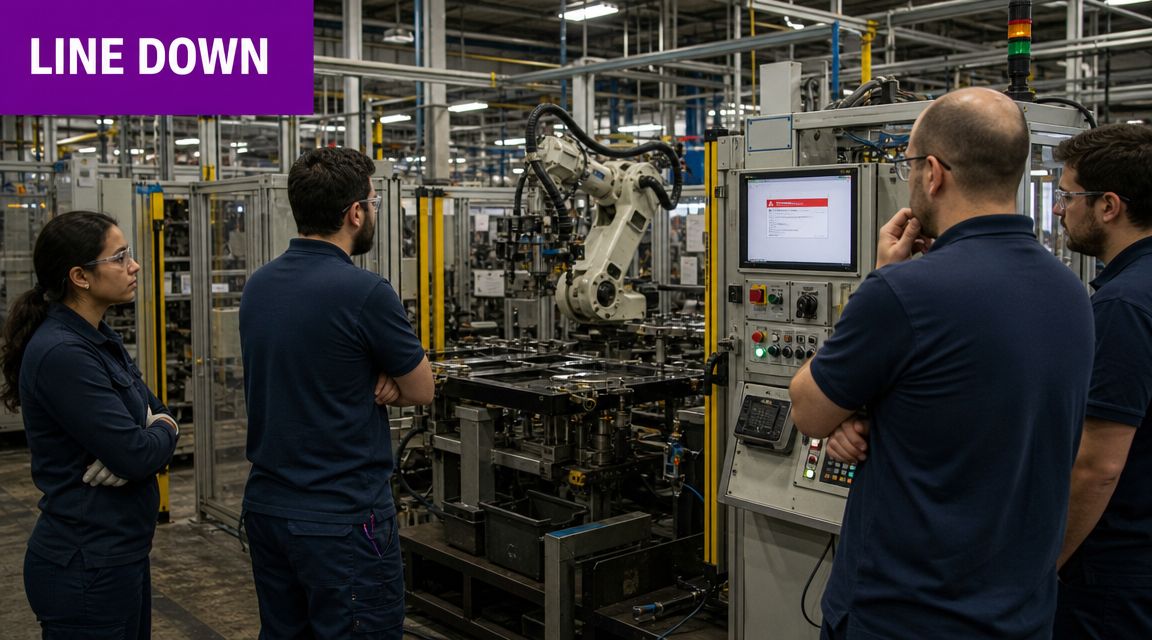
A generic support desk rarely knows what to do when the problem involves a PLC, SCADA workstation, industrial switch, machine vendor connection, or a legacy production application that only works because three old dependencies are still being preserved. In manufacturing, that gap shows up fast.
The business impact is larger than many firms realise. The UK manufacturing industry contributed about 8.9% of total UK business turnover and around 8.1% of UK business employment in 2022, according to this manufacturing sector analysis. When plants lose time, the effect isn’t limited to one user or one department. It can affect output, dispatch, customer commitments and supply-chain coordination.
What generic support usually misses
- Production context matters: Restarting a service in accounts is one thing. Restarting something tied to a running process can interrupt jobs, lose traceability or confuse operators.
- Legacy dependencies matter: Many factories still rely on systems that can’t be readily patched, replaced or moved without checking machine interfaces and vendor constraints.
- Escalation speed matters: On the shop floor, support needs to identify whether the issue is network, endpoint, application, control layer or physical equipment, then involve the right people quickly.
Generic IT support fixes devices. Manufacturing IT support protects production.
That’s why firms often move from ordinary support to specialist IT support for business-critical environments. The first real improvement usually isn’t a new tool. It’s getting a support model that understands both the office and the factory floor.
The Unique IT Challenges in UK Manufacturing
Manufacturing environments don’t struggle because they’re badly run. They struggle because they carry more technical contradiction than most businesses. Plants have to keep proven legacy equipment alive while introducing cloud services, stronger cyber controls, better reporting, and more connected operations.

OT and IT don’t work to the same rules
OT/IT convergence means connecting plant-floor systems that run machines with business systems that run planning, reporting, communication and decision-making.
That sounds sensible, and it is. It’s also where many risks begin. IT teams want standardisation, patching, identity control and visibility. OT teams want stability, deterministic behaviour and as little disruption as possible. Both are right.
A packaging line, CNC cell or process area may depend on hardware and software that is old but still operationally critical. Replacing it may require downtime, revalidation, supplier input or changes to connected systems upstream and downstream. So the plant keeps it. Then the business adds Microsoft 365, cloud reporting, remote access and modern security expectations around it.
Legacy systems are not just “old IT”
In manufacturing, a legacy server or workstation may be the bridge between production data and the rest of the business. If someone treats it like a normal office asset, they can break scheduling, quality records or line communications.
The challenge is even sharper because manufacturing was among the sectors most likely to report cyber breaches or attacks in the UK Government’s Cyber Security Breaches Survey 2025, as referenced in this manufacturing IT support overview. That’s why modernising IT without breaking legacy OT dependencies has become such a serious issue.
Data often exists, but not where people need it
Data silos are islands of information. The machine knows one thing, the maintenance team knows another, and the ERP reports something else entirely.
That’s why so many manufacturers can produce a part but still struggle to answer basic operational questions quickly. Which machine caused the repeat delay? Which order is waiting because of a quality hold? Which stock figure is current? If data sits in separate systems with weak integration, people make decisions late or manually.
The most persistent trouble spots
- Cyber security on mixed estates: Plants often run a blend of modern endpoints and older control-connected assets.
- Skills gaps: Internal teams may be strong in either infrastructure or engineering, but not both.
- Compliance pressure: Manufacturers must think about resilience, access control, auditability and data handling together.
- Support ownership confusion: When a fault crosses network, application and machine boundaries, teams can lose time arguing over who owns the issue.
The firms that handle this well stop treating OT and IT as separate kingdoms. They build a support approach that respects the difference while managing the connection properly.
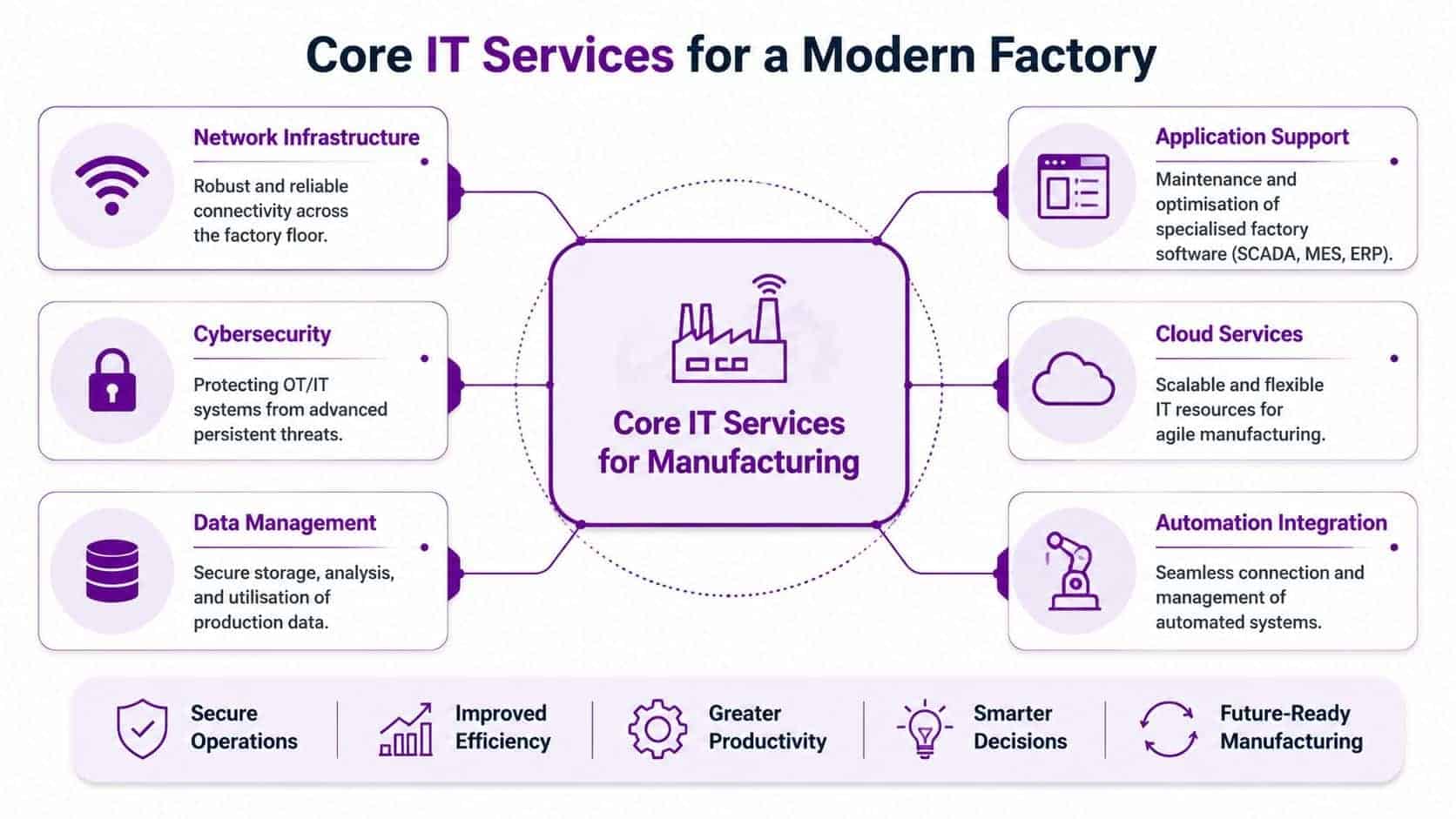
Core IT Services for a Modern Factory
Manufacturing support works best when it’s built in layers. Start with reliability, secure the estate properly, then connect data and applications in a way that helps operations rather than burdening them.
Start with the network and the boundaries
A factory can’t run well on brittle connectivity. Plants need reliable switching, wireless design where appropriate, secure segmentation, sensible remote access, and clear visibility into what connects to what.
Manufacturing guidance consistently points to the need for distinct layers in production environments, including network infrastructure management, industrial control system protection, and data analytics or performance monitoring, as outlined in this manufacturing network support guide. If a provider can’t explain those layers clearly, they probably don’t understand factory support sufficiently.
A practical support stack usually includes:
- Network infrastructure management: Stable connectivity across shop floor, warehouse and office.
- Segmentation and access control: Limiting unnecessary crossover between business systems and production assets.
- Remote support design: Giving approved internal staff and vendors the access they need without exposing more than necessary.
Secure the estate without breaking production
Cyber security in manufacturing isn’t just endpoint software and password resets. It’s about protecting identities, servers, workstations, cloud services and the operational edge without introducing unacceptable disruption.
That usually means:
- Identity and permissions control: Especially important where Microsoft 365, ERP, shared engineering data and production reporting meet.
- Patch planning with operations input: Not every asset can be updated on the same cycle as office devices.
- Monitoring and response: So the team can detect unusual behaviour before it becomes a production issue.
- Backup and recovery design: Focused on restoring critical systems in the right order.
Practical rule: If the cyber plan doesn’t account for maintenance windows, line dependencies and vendor-owned systems, it isn’t a manufacturing plan.
A capable partner should also understand where Microsoft services fit. For many firms, that includes Azure for controlled workloads, Microsoft 365 for communication and document control, and security tooling that gives visibility across identities, devices and cloud access.
Connect data to action
IT support for manufacturing moves beyond “keeping things running”. Properly connected data helps teams act sooner.
NIST’s advanced manufacturing guidance explains that IoT sensor data can be used to predict machine breakdowns and turn preventive maintenance into predictive maintenance, as described in NIST guidance on Industry 4.0 services. That matters because it changes IT from a support function into part of throughput improvement.
Here’s the video overview many leaders find useful before planning that journey:
Support the applications people actually use
Manufacturers don’t need a provider who only understands infrastructure. They need one who can support the applications that hold the business together.
That often includes:
- ERP and line-of-business platforms: Such as Microsoft Dynamics 365, where production-adjacent data meets finance, stock, service or sales processes.
- Microsoft 365 collaboration: For controlled document sharing, shift handovers, approvals and supplier communication.
- Power Platform tools: For workflow, reporting and low-code operational improvements.
- Reporting and dashboards: So managers can see issues without chasing spreadsheets.
Teams reviewing providers should pay close attention to IT infrastructure management capabilities in practical terms, especially where manufacturing networks, cloud services and business applications overlap. F1Group is one example of a Microsoft-focused provider that supports managed services, Azure, Dynamics 365, Power Platform and cyber security for organisations that need both day-to-day support and transformation capability.
Beyond Downtime Boosting Productivity with AI and Automation
The strongest support relationships don’t stop at uptime. They help manufacturers remove friction from daily work. That’s where AI and automation become useful, not as novelty projects, but as controlled ways to reduce admin, improve visibility and speed up decisions.
The biggest mistake is starting with the tool instead of the operating problem. A manufacturer doesn’t need “AI strategy” in the abstract. It needs better ways to handle production reporting, maintenance alerts, engineering knowledge, document retrieval, stock queries and exception handling.
Where AI support actually adds value
One under-served question in the market is whether an IT partner can safely enable Microsoft Copilot across shop-floor and back-office data. That issue is called out directly in this manufacturing AI support discussion. The answer depends less on the licence and more on the foundations behind it.
If permissions are messy, file structures are uncontrolled, and sensitive data is overshared, Copilot will surface that mess faster. If governance is sound, it can help teams work with information more efficiently.
Useful examples include:
- Engineering and maintenance teams using AI assistance to summarise documentation, compare fault notes and find previous fixes faster.
- Operations managers pulling together production reports, shift notes and issue summaries without manual collation.
- Sales and service teams querying current business data more naturally when Dynamics 365 and Microsoft 365 information is governed properly.
Automation usually delivers value before AI does
For many firms, Power Automate is the better starting point because it handles repetitive process work cleanly. That might mean routing approvals, notifying quality teams when a threshold is breached, escalating service issues, or moving information between Microsoft 365, Dynamics 365 and reporting tools.
Manufacturers exploring those use cases should understand what Power Automate is used for in day-to-day business workflows, because the practical gains often come from small, repeatable improvements rather than grand redesigns.
The best automation projects don’t try to transform the whole plant at once. They remove one recurring delay, one manual handoff, or one avoidable reporting task.
What doesn’t work
A few patterns consistently fail:
- Throwing AI at poor data: If naming, access and ownership are weak, the results won’t be trusted.
- Over-scoping pilots: Start with one workflow or one team, not every department.
- Ignoring UK GDPR and access design: Manufacturing firms often hold employee, supplier, customer and operational data in the same broad environment. That needs careful classification and permissions.
When support partners understand identity, governance, Microsoft tooling and factory operations together, AI becomes a productivity layer. Without that blend, it stays a demo.
Choosing a Support Model Project vs Managed Partnership
Manufacturers usually buy support in one of two ways. They either engage a provider for a specific change, or they form an ongoing managed relationship. Both can work. The wrong choice is usually the one that doesn’t match how the business operates.

When project-based support fits
A project model suits a clearly defined outcome. That might be a Microsoft 365 migration, an Azure deployment, a Dynamics 365 rollout, a network refresh, or a cyber remediation exercise.
Best for:
- Firms with strong internal IT leadership
- Plants solving one contained problem
- Organisations that need specialist delivery rather than ongoing operational support
Watch-outs:
- The provider may finish the project without owning the long-term operational consequences
- Knowledge transfer is often weaker than clients expect
- Issues that sit outside the project scope can be left unresolved
When a managed partnership fits better
A managed model is usually stronger where the business needs continuity, proactive monitoring, regular governance, user support, cyber oversight and ongoing improvement. That’s often reality in manufacturing because systems evolve, risks change, and the link between office IT and production rarely stays still.
The case for this model aligns with the broader push for digitalisation. The UK’s Made Smarter programme found that adopting digital technologies could add up to £455 billion to the UK economy over the next decade, according to this summary of manufacturing digitalisation data. That kind of change isn’t a one-off task. It’s a continuous improvement effort.
A simple way to decide
| Support model | Usually right when | Usually wrong when |
|---|---|---|
| Project-based | You know the scope, outcome and handover point | You need ongoing resilience, monitoring and roadmap support |
| Managed partnership | You need a long-term operating model for support and change | You only need one technical deliverable with no ongoing dependency |
A lot of firms begin with a project and then realise they still need strategic oversight afterwards. That's common. Manufacturing environments reward continuity because the difficult part usually isn't the install. It's the steady, disciplined management that follows.
How to Evaluate an IT Support Partner
Manufacturers shouldn't assess providers the way an office-only business would. Technical certifications matter, but they're not enough. You need evidence that the partner understands production environments, escalation paths, change risk and the practical design of mixed OT and IT estates.
One of the clearest technical tests is whether the provider can explain its design pattern for manufacturing networks. Production environments need distinct layers for network management, industrial control system protection, and data analytics or performance monitoring, as highlighted in the earlier manufacturing guidance. If a potential partner can't describe how those three layers work together, keep asking questions.
Questions that expose real capability
Ask how they patch and support systems in a live production environment. The answer should mention scheduling, risk assessment, rollback, operations coordination and asset criticality.
A good provider should also be comfortable discussing Microsoft 365, Azure, Dynamics 365, security tooling, remote access controls and line-of-business integration in the same conversation. If they split everything into isolated silos, you'll feel that fragmentation later.
Manufacturer's Checklist for IT Support Vendors
| Evaluation Area | Key Questions to Ask | What to Look For (Green Flags) |
|---|---|---|
| OT and IT understanding | How do you support both office systems and production-connected systems? | They can explain the difference between business IT and OT risk without oversimplifying either side. |
| Change control | How do you handle updates where systems support live production? | They talk about maintenance windows, testing, rollback planning and operational sign-off. |
| Cyber security | How do you protect identities, endpoints, remote access and production-connected assets together? | They discuss layered controls, access management, monitoring and incident response in practical terms. |
| Network architecture | How do you design manufacturing networks to separate critical functions? | They can articulate strategy for infrastructure, ICS protection and data visibility. |
| Legacy system support | How do you modernise around older systems that can’t be replaced quickly? | They focus on staged migration, dependency mapping and compensating controls. |
| Application support | What experience do you have with Microsoft 365, Azure, Dynamics 365 and operational integrations? | They describe support and integration in business language, not just product jargon. |
| Escalation model | What happens when an issue spans user devices, servers, applications and plant connectivity? | Clear ownership, named escalation routes and no ambiguity about coordination. |
| On-site capability | When do you attend site rather than trying to fix everything remotely? | They recognise that some manufacturing faults require physical presence and direct engagement. |
Red flags worth noting
- They only talk about ticket handling and response times
- They treat every device as if it were a standard desktop
- They can’t explain vendor access risk
- They push cloud migration without discussing production dependencies
- They avoid detailed questions about permissions, backups or recovery order
The right partner should sound measured, not theatrical. Manufacturing leaders usually trust the provider who talks openly about trade-offs.
Real-World Outcomes and Calculating ROI
Boards rarely approve manufacturing IT investment because the network looks tidier. They approve it because better support protects output, reduces friction and helps teams work faster with fewer avoidable disruptions.
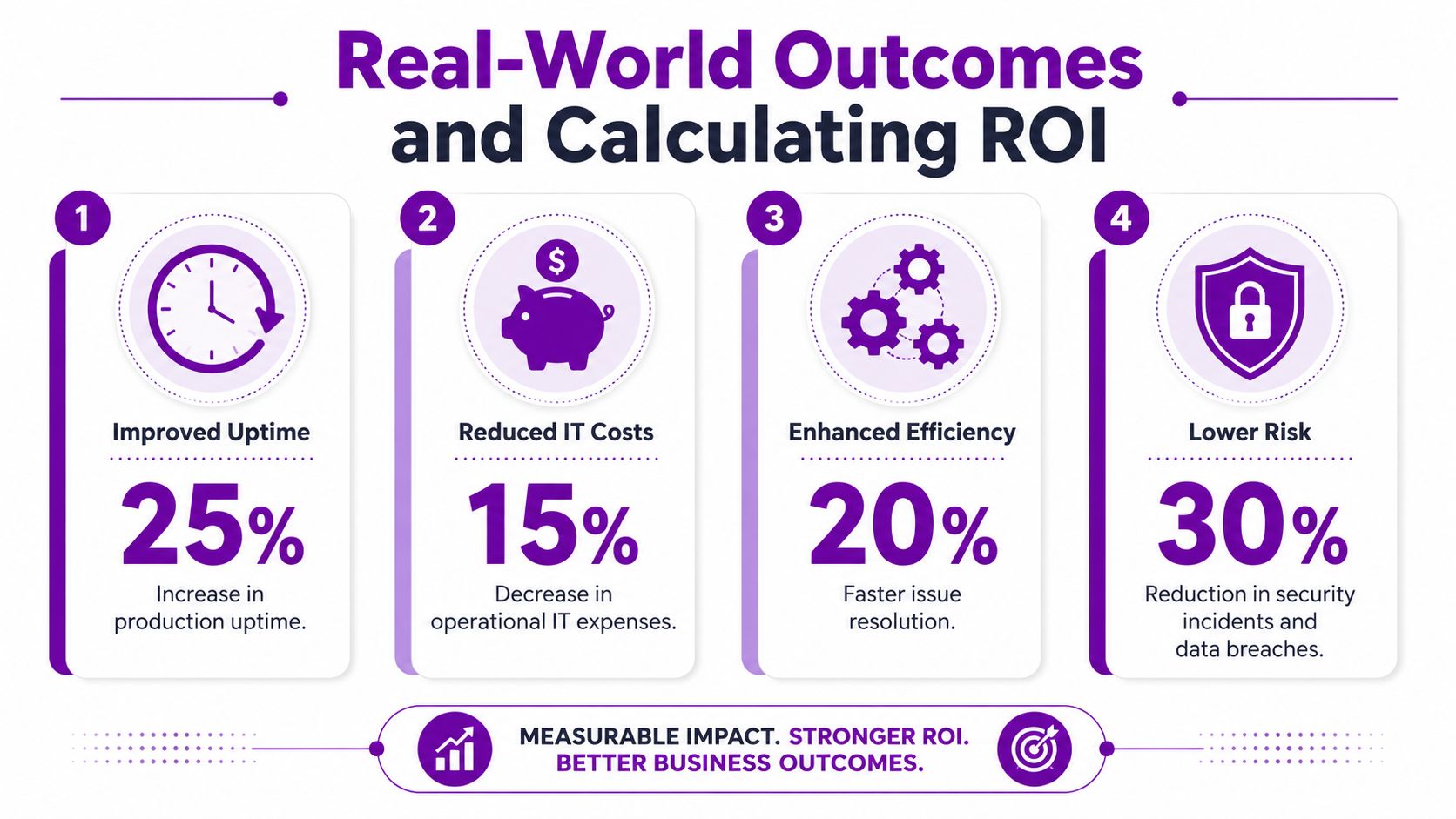
The strongest business cases usually combine several outcomes rather than chasing one headline number. That might include fewer production interruptions, less manual reporting, quicker fault escalation, cleaner cyber controls, and better use of operational data.
What to measure in practice
If you’re building an ROI case for IT support for manufacturing, start with metrics your leadership team already respects:
- Unplanned downtime trends
- Time to identify and resolve production-related IT issues
- Manual admin effort in reporting, approvals or handoffs
- Quality and traceability gaps caused by poor system integration
- Cyber resilience and recovery readiness
- Order flow friction between sales, planning, production and dispatch
Build the case in pounds, not theory
You don’t need invented benchmark percentages to justify the investment. Use your own plant reality.
For example:
- If a recurring integration fault stops planning data reaching the shop floor, calculate the labour and output impact of each event.
- If engineers spend hours pulling reports from multiple systems, price that wasted time in GBP and compare it with the cost of workflow automation or reporting integration.
- If legacy systems create security exposure, compare the cost of staged remediation with the operational risk of doing nothing.
The most credible ROI model is local. It uses your downtime history, your staff time, your order flow and your compliance exposure.
That approach also avoids a common mistake. Many firms buy support on monthly price alone, then ignore the hidden cost of repeat incidents, slow escalations and poorly managed change. In manufacturing, those hidden costs often matter more than the support fee itself.
Your Questions Answered
How much does specialised manufacturing IT support cost
A factory support contract is priced around risk, complexity and response expectations, not a flat market rate. A single site with standard Microsoft 365 needs is one thing. A business running multiple sites, ageing production systems, site-to-site links, cloud apps, integration points and tighter recovery requirements will pay for a very different level of cover.
The more useful question is this. Does the support model cost less than the disruption, delay and manual effort you are carrying today?
In manufacturing, that is the appropriate comparison. Set the cost in GBP, then weigh it against lost output, repeat faults, workarounds, cyber exposure and projects that stall because nobody has the time or specialist knowledge to move them on.
We have an in-house IT person, why would we need a partner
Because one person can know the business well and still not have enough bandwidth or specialist coverage to support a modern factory estate.
A strong internal IT lead often understands the people, the history, the line-of-business systems and the political realities better than any outside provider. What one person rarely brings at the same time is cyber security depth, Microsoft cloud skills, ERP and automation knowledge, infrastructure experience, out-of-hours resilience, and an understanding of how changes in business IT can affect production systems on the shop floor.
The best model is often blended. Internal IT keeps control, local context and day-to-day relationships. The external partner adds escalation capacity, specialist engineers and a wider view of how to connect legacy OT-dependent environments with newer cloud platforms without creating avoidable risk.
How long does it take to move to a managed service
That depends on how well your current estate is documented and how much hidden technical debt sits underneath it.
A sensible transition starts with discovery. That includes asset reviews, access and permissions checks, support process mapping, backup validation, dependency tracking and identification of systems that production still relies on, even if they are old or poorly documented. From there, the new provider can phase in monitoring, service desk processes, security controls, knowledge capture and a realistic improvement plan.
Speed matters less than order. In a factory environment, the first priority is to stabilise support around production-critical systems. Improvement comes next.
Can we modernise cloud systems without disrupting production
Yes, if the plan is built around dependencies rather than software wish lists.
The risk is not cloud adoption on its own. The risk is treating a manufacturing environment like a standard office rollout, where a failed change is inconvenient rather than operationally expensive. Good transitions use staged deployment, testing where possible, rollback plans, pilot groups and close coordination with engineering, operations and production planning.
That matters most where older OT, data collection tools or machine-adjacent systems still feed modern business platforms. If those links break, the issue is no longer just IT. It hits scheduling, traceability, reporting and dispatch.
Is AI worth considering now, or should we wait
AI is worth testing now if your data, permissions and governance are in reasonable shape.
It is not a starting point for firms still struggling with basic access control, inconsistent master data or unclear ownership between OT and IT. In those cases, the first job is to fix the plumbing. Once that is in place, manufacturers tend to get better results from narrow pilots such as document retrieval, reporting assistance, service triage or workflow automation than from broad rollouts with vague goals.
Used well, AI helps remove admin friction around the factory. It does not replace the need to sort out the underlying systems first.
F1Group provides dependable IT support for organisations across the East Midlands, including manufacturers that need practical help with Microsoft 365, Azure, Dynamics 365, Power Platform, cyber security and managed services. If you want to discuss IT support for manufacturing in a way that respects both operational technology and business IT, phone 0845 855 0000 today or send us a message.